

Embed Player
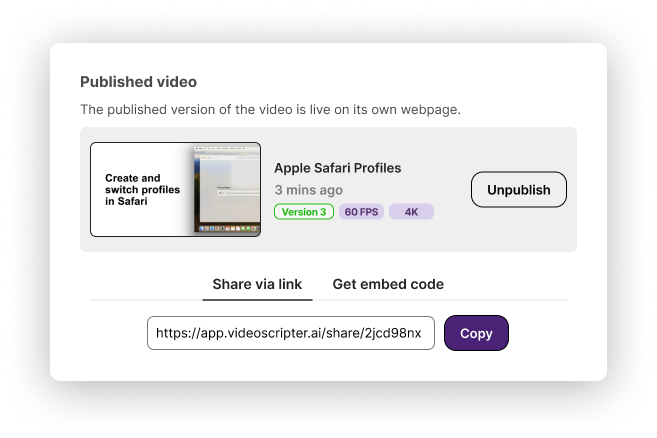
The Publish feature creates a dedicated webpage for your video with a shareable link and an HTML embed code. Embed videos on websites, help centers, or share them externally.
Publishing a video
Section titled “Publishing a video”
- Open your generated video
- Click Publish
- Choose how to share:
- Share link — a unique URL for the video’s dedicated page
- Embed code — HTML snippet to embed the player on any website
Managing published versions
Section titled “Managing published versions”You can publish multiple versions of the same video and control which one viewers see. Older versions can be unpublished or replaced with updated ones — giving you full control over what’s publicly visible.
Downloading MP4
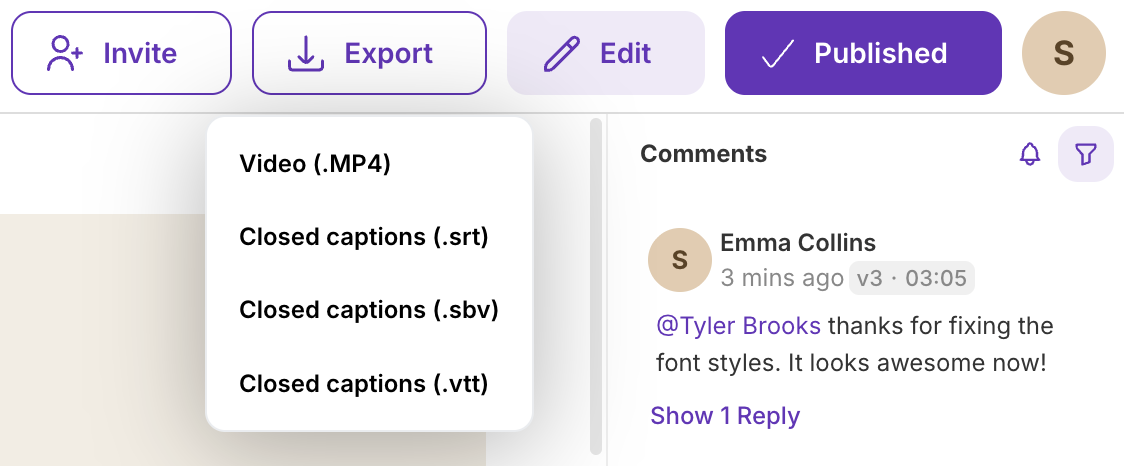
Section titled “Downloading MP4”In addition to publishing on the platform, you can download the video file directly in MP4 format for uploading to YouTube, Vimeo, or any other hosting service.
Closed caption files
Section titled “Closed caption files”Download caption files in SRT, SBV, or VTT format for platforms that support closed captioning. See Captions: Closed vs. Open for guidance on which type to use.
Where to embed
Section titled “Where to embed”The embed player works on:
- Help centers — Zendesk, Freshdesk, Intercom
- Websites — any HTML page, WordPress, Webflow, HubSpot
- LMS platforms — any system that accepts iframe embeds
- Internal tools — Confluence, Notion, SharePoint
- Email — share the link (not embed) for email distribution
Multilingual embed
Section titled “Multilingual embed”If you’ve created translations, the Multilingual Player bundles all languages into a single embed with an in-player language selector.
Next steps
Section titled “Next steps”- Export Video — Generate videos before publishing
- Generate Documentation — Create written articles alongside video
- Multilingual Player — Embed with language switching