Video to SCORM Export · Enterprise
Turn Any Tutorial Video into a SCORM Course
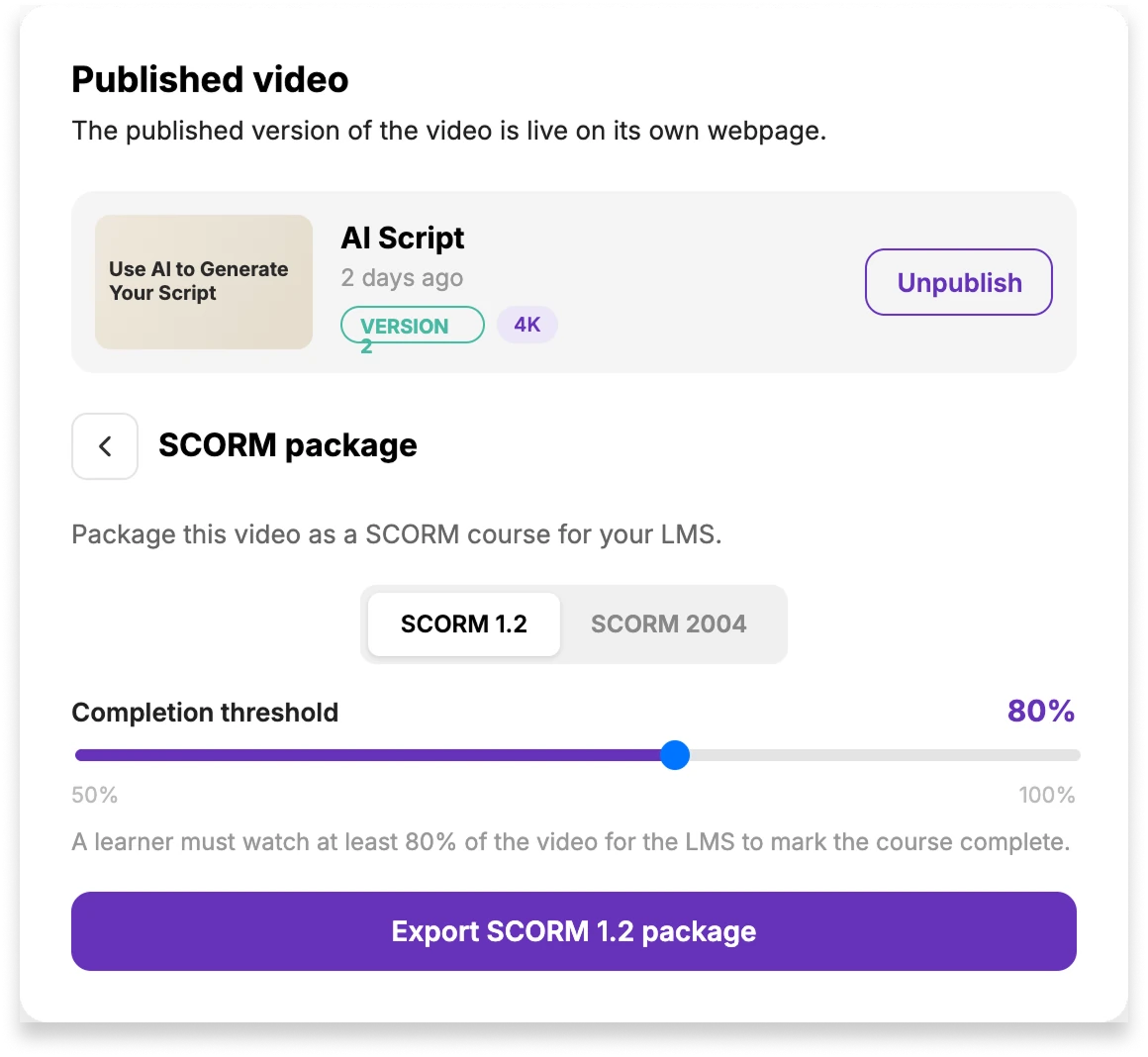
Export any published Tutorial AI video as a SCORM 1.2 or SCORM 2004 package. Set the completion threshold, download the .zip and upload it to your LMS so learner completion reports back automatically.
Works with LMS platforms that accept SCORM 1.2 or SCORM 2004. Confirm the required version with your LMS administrator.
The problem
Export Training Videos to the LMS You Already Use
Share links alone
- •No way to prove who finished the training
- •Compliance evidence lives in a spreadsheet someone updates by hand
- •New hires get sent a Google Doc of links instead of a course
- •Content sits outside the system your L&D team already runs
Video, delivered as a course
 Completion tracked per learner, reported back to the LMS
- Threshold you control — 50% to 100% of the video
- Delivered through the LMS learners already log in to
- Standard SCORM .zip linked to the published Tutorial AI video
How it works
Video to SCORM in 3 Steps
Publish the video
Finish your video and publish it. SCORM export packages whatever the current published version renders — script edits, blur, cuts, translations, all of it.
Pick the version and threshold
Choose SCORM 1.2 or 2004 to match your LMS. Set the completion threshold anywhere from 50% to 100% — that's the share of the video a learner has to watch for the course to count.
Export the SCORM Package and Upload It to Your LMS
Download the .zip and upload it to your LMS as a SCORM course. Learners hit play, watch, and completion reports back to the LMS the moment they cross your threshold.
SCORM 1.2 vs 2004
Export SCORM 1.2 or SCORM 2004
Tutorial AI exports both. The toggle in the SCORM panel switches between them — the download button updates to match.
The default
SCORM 1.2
The most widely supported version. If your LMS accepts SCORM at all, it almost certainly accepts 1.2. Simple, mature, and battle-tested.
- Universal LMS compatibility
- Completion + score reporting
- Pick this if you're unsure
The newer standard
SCORM 2004
The newer standard. Richer status model — separates completion from success, adds finer sequencing support. Choose it if your LMS admin has asked for 2004 specifically.
- Separate completion / success status
- Extended sequencing support
- Pick this if your LMS requires it
xAPI (Tin Can)
Coming SoonRicher, statement-based tracking that sends learner activity to your Learning Record Store. If your L&D stack is built around an LRS, we'll have you covered — talk to us if you need it soon.
Completion threshold
You decide what
"complete" means.
Drag the slider anywhere between 50% and 100%. That's the share of the video a learner must watch for the LMS to mark the course complete.
Completion threshold
A learner must watch at least 80% of the video for the LMS to mark the course complete.
Why it matters
Built for L&D teams
Completion tracked where L&D already looks
The package reports progress back to your LMS in the format it already reads. Managers see who watched what — no spreadsheets, no manual check-ins, no reminder pings.
One standard, every LMS
SCORM is the format learning platforms already speak. If your LMS supports SCORM 1.2 or 2004 — and nearly all of them do — the .zip drops in and just works. No integration project.
You own the file
The download is a standard SCORM .zip that launches the published Tutorial AI video and reports course status back to the LMS. Keep the file in your LMS; when the Tutorial AI video is republished, the learner sees the updated version without generating a new package.
Use cases
When to Convert a Training Video to SCORM
Onboarding
Employee onboarding at scale
Ship day-one training as SCORM courses inside your LMS. Every new hire gets the same walkthroughs, and HR sees completion rates without chasing anyone.
Compliance
Compliance & certification
Set a completion threshold, export the package, and let the LMS gate certification on it. Auditors get a clean paper trail — the LMS already has the record.
Product
Customer academies
Distribute product training through the same LMS your customers already use. One SCORM zip per course — publish, ship, done.
FAQ
Frequently asked questions
Can Tutorial AI export video to SCORM 1.2 and SCORM 2004?
How does completion work?
Do I need to re-export if I edit the video?
Which LMS platforms can use the SCORM package?
Which Tutorial AI plan includes SCORM export?
Does the package track anything beyond completion?
Do you support xAPI (Tin Can)?
Want the step-by-step? Read the SCORM export help article.
Turn Your Next Training Video into a SCORM Course
Create the video in Tutorial AI, publish it, then export a SCORM package for your LMS with completion tracking.