A developer is stuck on a setup step that seemed obvious. A field technician is troubleshooting a sensor late at night. A compliance officer is searching for the current procedure while an audit is already underway. In each case, the question isn’t whether the company has information. The question is whether the right person can find reliable information and use it without guessing.
That’s the practical answer to what is a technical document: it’s a structured information asset that helps a defined reader complete a task, understand a system, or make a decision accurately. It might be a user guide, API reference, installation manual, SOP, release note, or knowledge-base article. What makes it technical isn’t the file format or the amount of jargon. It’s the document’s operational purpose.
A Clear Definition You Can Actually Use
A technical document is a fixed, structured amount of information that can be managed and exchanged as a unit between people and systems. That standards-based definition is reflected in ISO terminology and in ISO 10209 terminology for technical product documentation, which covers drawings, product definition, and related documentation across fields of application.
For onboarding a new technical writer, use this working definition:
A technical document exists to help a specific reader do a specific thing, understand a specific system, or make a specific decision with minimal ambiguity.
The elevator analogy helps. A marketing PDF is the building’s lobby brochure. It creates interest, presents the building attractively, and encourages visitors to go inside. A technical document is the building’s official elevator panel and operating guide. It has to tell someone which control to use, what the indicators mean, what limitations apply, and what to do if the elevator stops.
That distinction explains why technical documents support safety, compliance, risk assessment, and reliable product use, not just convenience. The history of technical documentation standards reinforces this point. The UK standard BS 308, an important precursor in technical product documentation, was first published in September 1927. It was revised several times before being folded into BS 8888, first published in August 2000, which reached its eighth edition in January 2017. That edition incorporated international standards published since 2013, showing that technical documentation follows evolving rules rather than one permanent template. (BS 308 and BS 8888 publication history)
Who writes and reads one
Engineers, product specialists, developers, support teams, compliance professionals, trainers, and technical writers may all create technical documents. Their readers are usually task-oriented, even when they have different levels of expertise.
A new customer may need an installation guide. An experienced developer may need an API reference. An operator may need a procedure with warnings and expected results. A service team may need troubleshooting logic. In each case, the document should identify the reader’s context and remove unnecessary decisions.
Standards such as IEC/IEEE 82079-1 and IEEE/ISO/IEC 26514 treat instructions for use and software user information as controlled deliverables with audience-specific structures, content rules, and presentation requirements. (IEC/IEEE 82079-1 and software user information) If the document’s purpose, audience, and required outcome are unclear, the writing process is already off track.
For teams producing product tutorials, an automated video pipeline guide can also help organize the source material before documentation is drafted. The important principle remains the same: the final artifact must help a reader act, not merely describe what the product looks like.
How Technical Documents Differ From Other Docs
A PDF doesn’t become technical documentation because it contains screenshots, diagrams, or specialized vocabulary. Classification depends on who uses it, what they’re trying to do, how the content is maintained, and what success means.
The most useful test compares a document with nearby artifacts that often share the same file format.
| Document type | Primary reader | Persuasive intent | Update owner | Shelf life | Success metric |
|---|---|---|---|---|---|
| Technical document | User, operator, developer, service team | Explain and enable correct action | Product or documentation owner | Changes with the product | Reader completes the task correctly |
| Marketing collateral | Buyer or prospect | Create interest and support a purchase | Marketing team | Changes with the campaign or offer | Reader advances toward evaluation or purchase |
| White paper | Decision-maker or specialist | Build an argument or frame a problem | Subject-matter or marketing team | Remains useful while its argument holds | Reader accepts the analysis or point of view |
| Academic paper | Research community | Present and support original scholarship | Authors and publisher | Tied to its research context | Readers can assess and build on the work |
| Runbook | Internal operator or responder | Execute a known operational response | Operations or engineering team | Changes with the environment and process | Operator restores, changes, or maintains a system |
| Compliance record | Auditor, regulator, or responsible team | Demonstrate conformity or traceability | Quality, legal, or compliance owner | Retained according to governing requirements | Evidence is complete, current, and defensible |
The six questions that classify the file
Start with the reader’s job. If the reader is deciding whether to buy, the artifact is probably marketing collateral. If the reader is following a recovery sequence during an incident, it’s probably a runbook. If the reader is learning how to configure a product, it’s technical documentation.
Next, ask whether persuasion is the main goal. Technical documents can explain benefits, but their primary function is not to persuade. They specify requirements, procedures, conditions, warnings, and expected results.
Then check currency. A product guide, API reference, or installation manual should change when the product changes. A white paper may remain stable while its argument remains relevant. A runbook can change because the operating environment changes, even if the product itself doesn’t.
Ownership matters too. The team responsible for the product or process should own accuracy, review, and release alignment. Finally, define success. A campaign document succeeds when it moves a buyer forward. A technical document succeeds when a stranger can use it correctly.
The separation point many teams miss is version alignment. Technical documentation ages with the artifact it describes. A PDF that claims to document the current interface but shows an old workflow is not merely less attractive. It’s operationally unreliable.
Common Types You Will Encounter
Different technical documents answer different moments of need. Choosing the right format starts with listening to the problem a team is reporting.
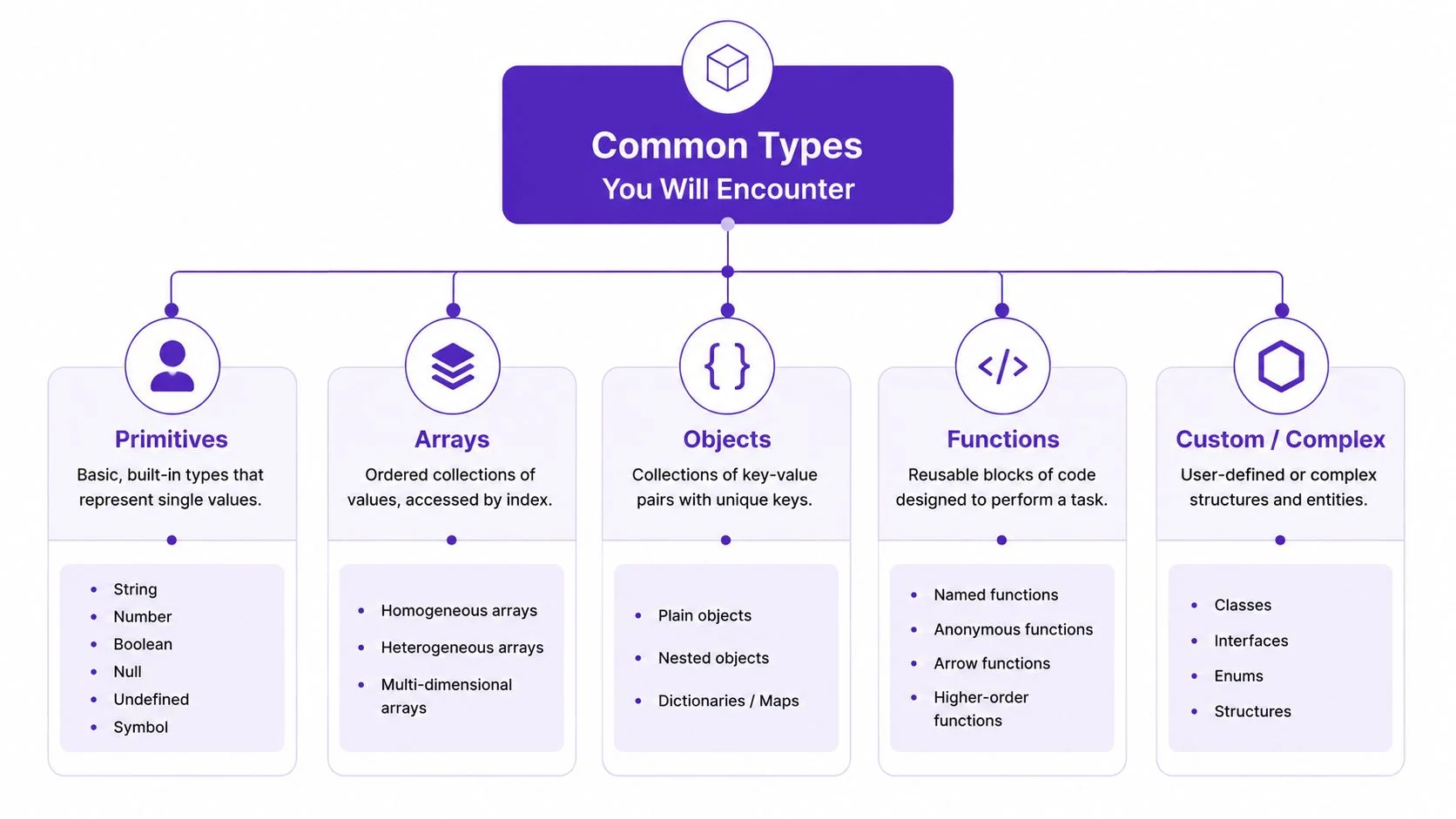
User guides and installation manuals
Use a user guide when customers need to learn the product’s main tasks, settings, and operating concepts. The trigger phrase is, “We keep getting tickets about onboarding.” That usually signals that the guide buries the first successful task beneath background information.
Use an installation manual when the reader must prepare an environment, connect components, or complete a controlled setup. A poor installation manual assumes prerequisites, hides warnings, or leaves the reader unsure whether each step worked. The best version states what must be available before installation and what outcome confirms completion.
API references
An API reference serves developers who need exact details about endpoints, parameters, authentication, response objects, and errors. The trigger phrase is, “The integration works for the happy path, but developers can’t diagnose failures.” A reference that omits an error code or gives an incomplete parameter description forces readers to search through source code or support tickets.
Reference pages are usually not a substitute for conceptual guides. The reference tells a developer what a method accepts and returns. A tutorial explains how several methods work together to solve a task.
Standard operating procedures
An SOP supports a repeatable internal process. The reader may be an operator, support specialist, quality team, or contractor who needs to perform the process consistently. “Can this pass an audit?” is the key trigger phrase.
A weak SOP uses informal language, omits ownership, and provides no evidence of completion. A strong one identifies scope, conditions, responsibilities, required records, exceptions, and review status. It may overlap with a runbook, but the intended use differs. An SOP governs a repeatable process. A runbook usually helps an operator respond to a specific operational condition.
Release notes and knowledge-base articles
Release notes tell existing users what changed and what they need to do. “The feature shipped, but customers don’t know whether they need to migrate” points to a release-note gap. Good release notes identify impact, availability, changed behavior, migration actions, and relevant limitations.
A knowledge-base article handles a focused question, often in a support or self-service context. The trigger phrase is, “Customers find the article once, but search doesn’t surface it again.” That suggests weak indexing, unclear headings, outdated terminology, or missing links. The article should answer one problem directly and tell the reader what to do next.
Format rule: Choose the document type according to the reader’s immediate job. Use a guide for learning, a reference for lookup, an SOP for controlled repetition, a runbook for response, and a knowledge-base article for a focused problem.
A record-transcribe-polish workflow can reduce duplication across these formats. One product walkthrough can provide source material for a video, an onboarding article, a support explanation, and internal training content, but each output still needs its own audience review. See this practical overview of types of documentation for a broader classification framework.
Standard Structure and Core Components
A strong technical document gives the reader a predictable path. The exact template varies by product and audience, but six building blocks consistently make the information easier to use.
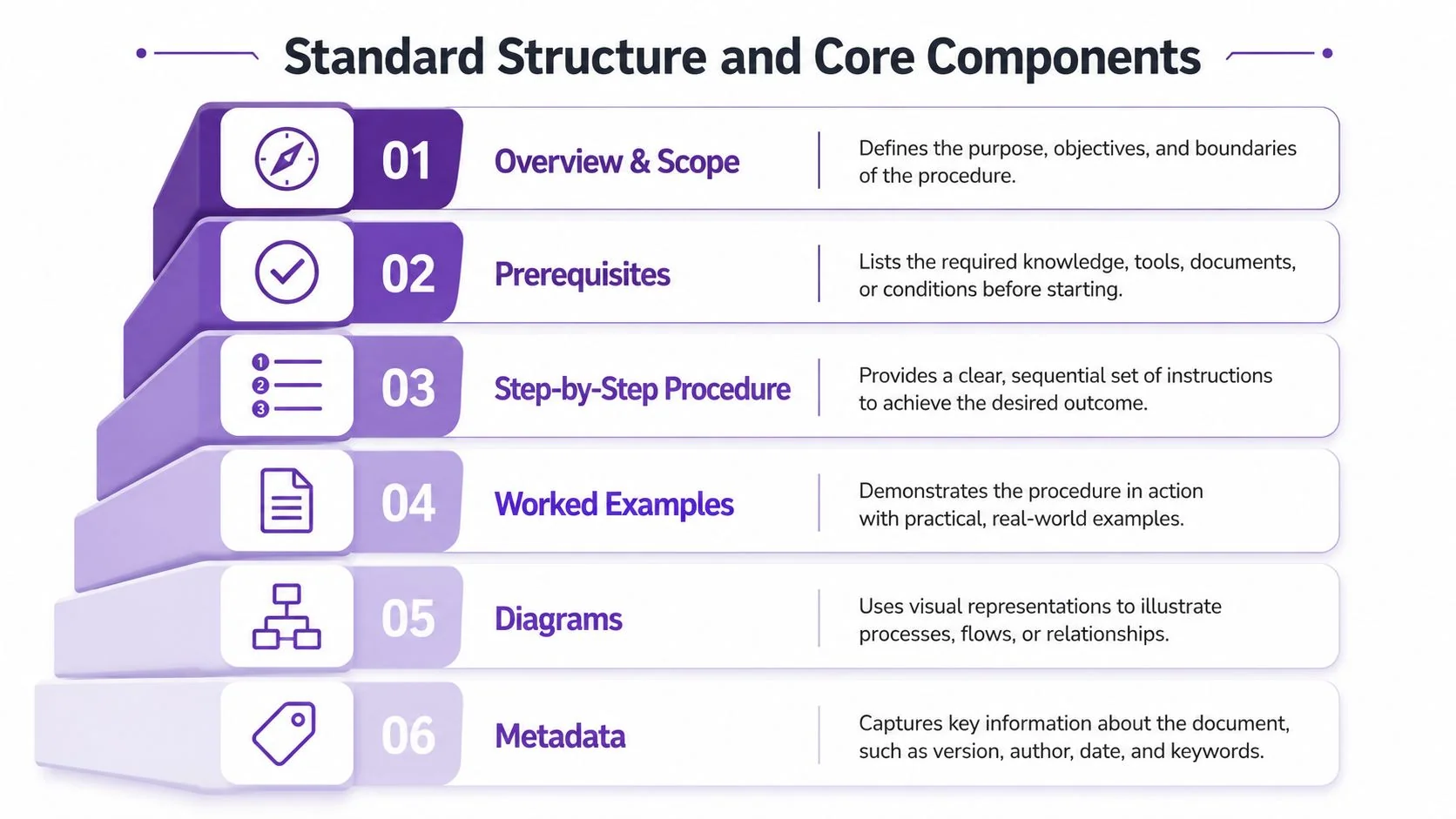
Take an API integration guide. The overview and scope should say what the integration does, who should use it, and what it doesn’t cover. This prevents a developer from applying the instructions to the wrong product area.
The prerequisites should list the required account access, credentials, supported environment, permissions, and starting configuration. Missing prerequisites waste effort before the first step begins. They also create avoidable support requests because readers interpret setup failures as product failures.
The procedure and proof
The step-by-step procedure locks in sequence. Each numbered step should contain one meaningful action, identify the relevant interface or request, and state the expected result when that’s useful. “Configure the integration” is weaker than “Add the callback URL, save the setting, and confirm that the status changes to Active.”
Worked examples translate abstract rules into a usable pattern. An API guide might show a request with annotations explaining the required field, an optional value, and the response the developer should expect. Examples should remain synchronized with the current product behavior.
Diagrams compress relationships that are difficult to hold in prose. A sequence diagram might show the application sending a request, the API validating it, and the service returning a response. A system diagram might clarify which component owns each responsibility.
The trust layer
Metadata keeps the document trustworthy. Include the owner, product version, review status, last reviewed date, applicable locale, and change history where appropriate. Readers need to know whether they’re using an authoritative document or an abandoned copy.
IEEE-style documentation guidance, including the structure principles associated with IEEE 1063, supports organizing software user information around purpose, audience, procedures, and supporting material. A practical technical documentation format guide can help teams turn those principles into a repeatable page structure.
The structure works because each component prevents a different failure: wrong context, blocked setup, incorrect order, abstract interpretation, architectural confusion, or loss of trust.
From Raw Recording to Polished Doc in One Workflow
A useful documentation workflow can begin with a product expert explaining a task while recording the screen. The production loop is record, transcribe, polish, and ship, with the written article treated as the durable reference and the video used as the explainer.
Screen recordings often contain pauses, corrections, and revisions. Guidance from Northern Illinois University recommends outlining a recording, practicing before capture, and pausing after mistakes so the unwanted material can be removed during editing. (Northern Illinois University screen-recording guidance) A study of computer-assisted writing also defines pauses as nonscribal periods between keystrokes and uses screen recordings to examine those pauses and revisions. (Study of pauses in computer-assisted writing)
Those signals are useful editorial evidence. A hesitation before a setting, a correction such as “wait,” or a repeated explanation can point to a confusing interface or a missing prerequisite. The writer can turn those moments into headings, warnings, examples, or FAQ entries instead of deleting the evidence entirely.
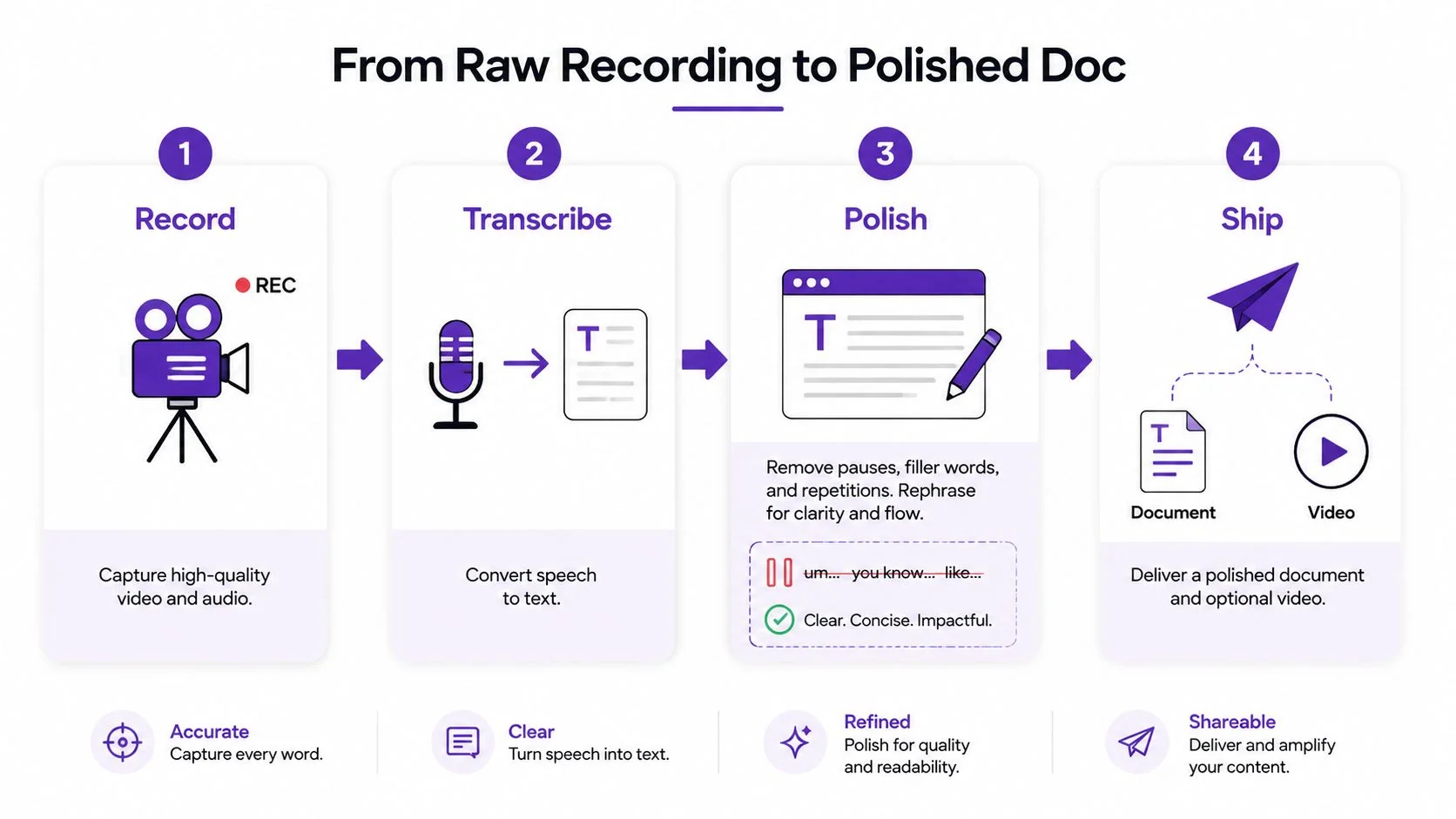
A practical sequence looks like this:
- Capture the screen and narration: Have the subject-matter expert perform the task and explain decisions in plain language.
- Transcribe the recording: Separate spoken explanation from interface actions and identify terminology that needs checking.
- Segment by task: Turn the transcript into sections such as prerequisites, procedure, expected result, troubleshooting, and FAQ.
- Polish the draft: Remove rambling, resolve contradictions, add screenshots or diagrams, and verify every instruction against the product.
- Ship both formats: Publish the article as the searchable reference and embed the video for readers who benefit from visual explanation.
A transcript-to-article workflow can produce a draft document and supporting knowledge-base material from the same recording. It doesn’t remove the recording step or replace subject-matter review. It gives the expert a more efficient starting point and preserves alignment between the visual walkthrough and the written instructions. The guide to automating documentation explores this workflow in more detail.
Best Practices That Hold Up in 2026
Documentation quality depends less on sounding polished than on making the correct action easy to identify, verify, and repeat. Four practices give teams a durable baseline.
| Pillar | Underlying Standard | Common Failure It Prevents |
|---|---|---|
| Audience-specific clarity | ISO/IEC 26514 and related user-information guidance | Jargon, undefined acronyms, and irrelevant detail |
| Product-aligned versioning | Controlled documentation practice and lifecycle governance | Instructions that no longer match the product |
| Localization readiness | EN ISO 17100 and structured content practice | Translation ambiguity and inconsistent terminology |
| Accessible delivery | WCAG 2.2 | Barriers caused by media, layout, color, or reading order |
Write for one viable reader profile
Choose the smallest useful audience rather than writing for “everyone.” A new administrator configuring access needs different context from an experienced developer looking up a parameter. Define every acronym on first use, label assumptions, and state the expected outcome after important actions.
Version the document with the artifact
Keep the document connected to the product release, interface version, or process revision it describes. Add a visible change history and assign an owner who can review it when the source changes. A document without ownership may look complete while becoming unsafe or misleading.
Prepare content for localization
Separate content from presentation where possible. Avoid idioms, jokes, embedded text inside images, and locale-specific date formats that create unnecessary translation work. Maintain consistent terminology for interface labels, warnings, and product concepts, especially when the same content will appear in a video, article, and support response.
Build for access from the start
Use descriptive alt text, captions for spoken media, sufficient color contrast, and a reading order that matches the document’s actual structure. Don’t rely on color alone to communicate status or importance. Accessibility is part of technical usefulness because a reader can’t complete a task from information they can’t perceive or access.
Editorial test: They came here to do a thing. Help them do it.
A Real-World Doc Example Worth Studying
Consider an onboarding document for a fictional analytics API. The weak version may be accurate in fragments, but it makes the reader assemble the path themselves.
| Element | Weak Version | Strong Version |
|---|---|---|
| Purpose | “Analytics integration information” | “Send your first event and verify the response” |
| Prerequisites | “You need an account and API access” | “Create a workspace, generate an API token, and confirm permission to send events” |
| Procedure | “Configure the endpoint and submit the request” | Numbered steps with the request, required fields, and expected response after each action |
| Example | Unannotated request block | Code sample with comments identifying required and optional values |
| Metadata | No owner or version | Owner, product version, review status, and change history |
| Troubleshooting | “Contact support if it fails” | FAQ covering authentication failure, invalid fields, and delayed event visibility |
The revised version doesn’t add value by becoming longer. It makes the reader’s path visible. The overview establishes the first outcome, the prerequisites prevent a blocked start, and the numbered procedure makes sequence explicit.
The annotated code sample handles a common API problem: developers often know what a request looks like but not which parts they can change. Expected responses give them a test for progress instead of leaving them to infer whether the integration worked.
The metadata header also changes the reader’s confidence. An owner and review status identify responsibility, while a change history helps a support specialist decide whether an older ticket refers to the same behavior.
The FAQ at the end captures questions that don’t belong in the main happy path. It can explain what to check when authentication fails or why an event may not appear immediately, without interrupting the first successful integration.
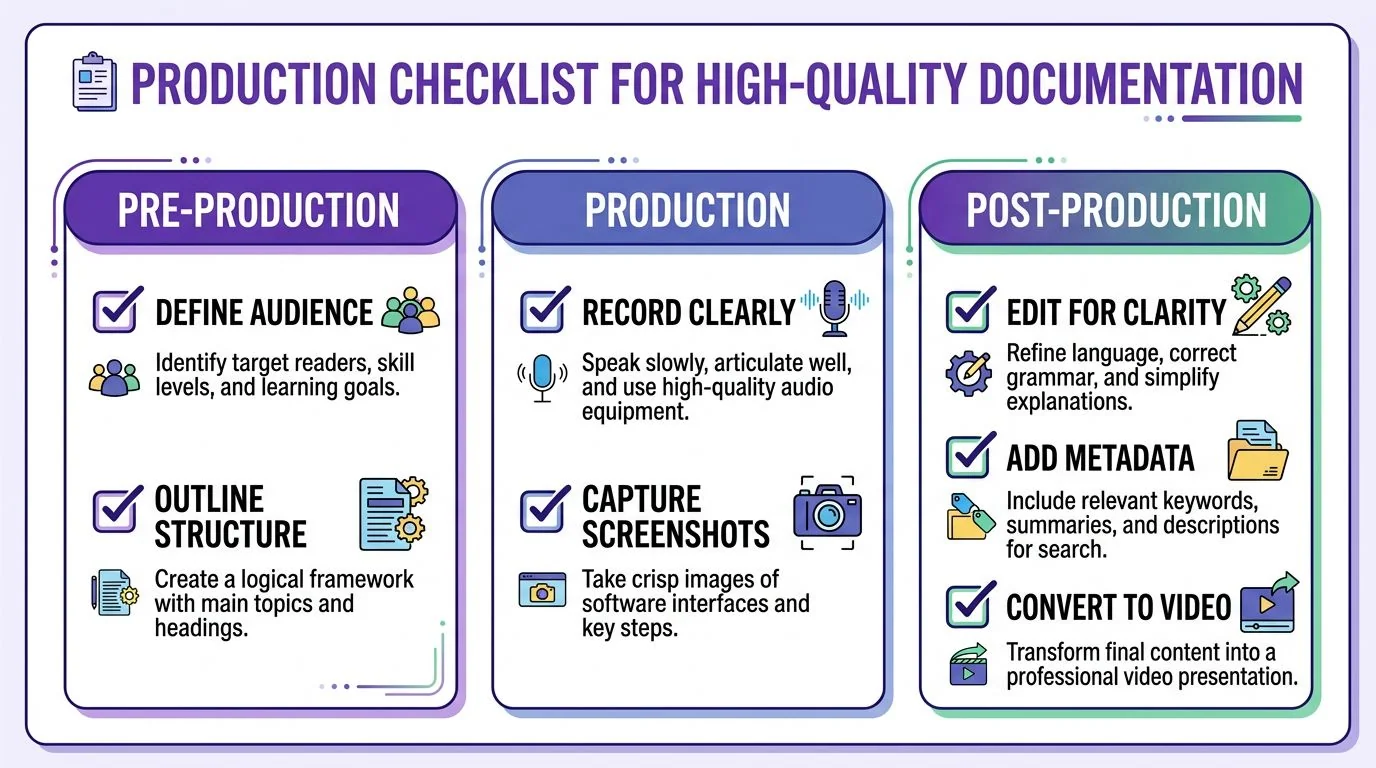
Production Checklist for High-Quality Documentation
Use this checklist during the next documentation sprint. Each item should result in a visible deliverable, not a general intention.
Pre-production
- Name the reader: Write one sentence identifying the role, starting condition, and task.
- Define the scope: State what the document covers and exclude adjacent workflows that need separate guidance.
- Collect the source: Gather the current product behavior, interface labels, requirements, screenshots, diagrams, and subject-matter explanation.
- Choose the format: Decide whether the reader needs a guide, reference, SOP, runbook, release note, or focused knowledge-base article.
- Record the task: Capture the product expert performing the workflow if visual explanation or reusable source material will help.
Drafting
- Write the outcome first: Describe what the reader will be able to do when the procedure is complete.
- List prerequisites: Include access, permissions, dependencies, starting state, and any safety or compliance conditions.
- Number the actions: Keep the sequence explicit and add an expected result where the reader needs confirmation.
- Add one worked example: Annotate the example so the reader understands which values, fields, or decisions matter.
- Use a useful diagram: Show relationships, sequence, architecture, or decision logic that prose would obscure.
- Extract questions: Turn hesitation, corrections, support history, and expert explanations into troubleshooting or FAQ content.
- Plan the paired media: Embed a tutorial video when motion, interface location, or timing is easier to show than describe.
Review and publishing
- Run a peer walkthrough: Ask a teammate who wasn’t involved in drafting to follow the instructions without verbal help.
- Perform an accuracy pass: Compare every interface label, example, warning, and expected result with the current product.
- Check accessibility: Verify headings, alt text, captions, contrast, keyboard navigation, and reading order.
- Add metadata: Record the owner, product or process version, review status, applicable audience, and change history.
- Flag localization needs: Identify text in images, terminology decisions, locale-sensitive content, and media that needs translated narration or captions.
- Prepare search metadata: Use the reader’s language in the title, headings, summary, and internal links.
- Publish the source of truth: Link related videos, references, release notes, and support articles back to the maintained document.
Tutorial AI turns a single screen recording and spoken narration into an edited tutorial video, then generates a matching written article from the same recording. If your team needs product demos, customer onboarding, knowledge-base videos, internal training, SOP walkthroughs, or sales enablement content, visit Tutorial AI to create both formats from one documented workflow.